

Map the network.Keep the proof.
Trace is a desktop workbench for OSINT analysts, researchers and investigators. Build the graph, cite every source, and keep the whole case as plain Markdown on your own machine.
Other downloads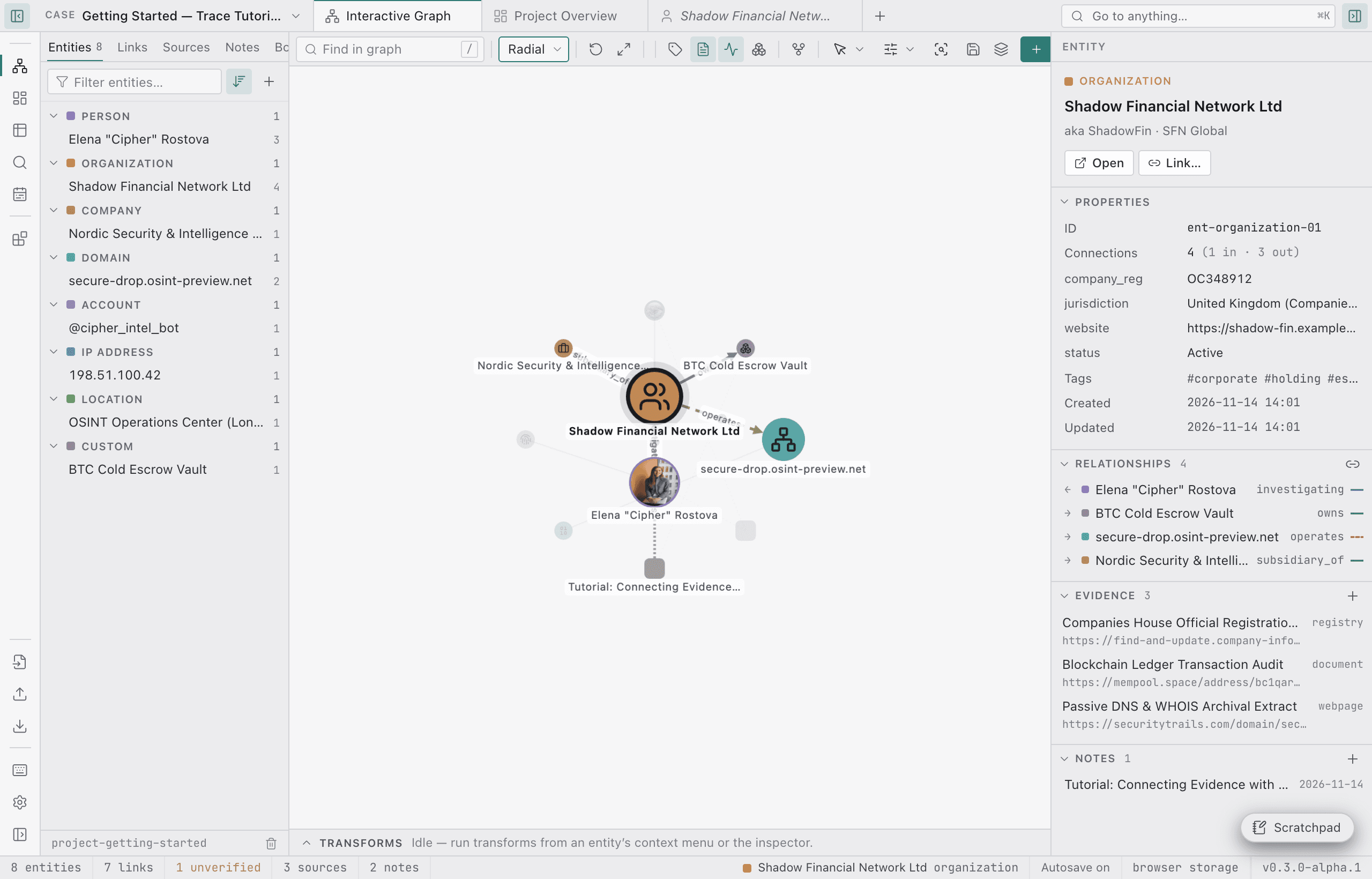
Local-first by design
Plain Markdown
A case is a folder of Markdown files: entities, relationships, sources and notes. It diffs well and works with git.
No cloud
No accounts, no sync, no telemetry. Your case stays on your machine.
Works offline
The graph, records, search and notes need no connection. Only tools that query the internet do.
Everything an investigation needs, in one workbench
Collect, analyse, prove and protect. Each part works on the same plain files.
GRAPH_VIEW01
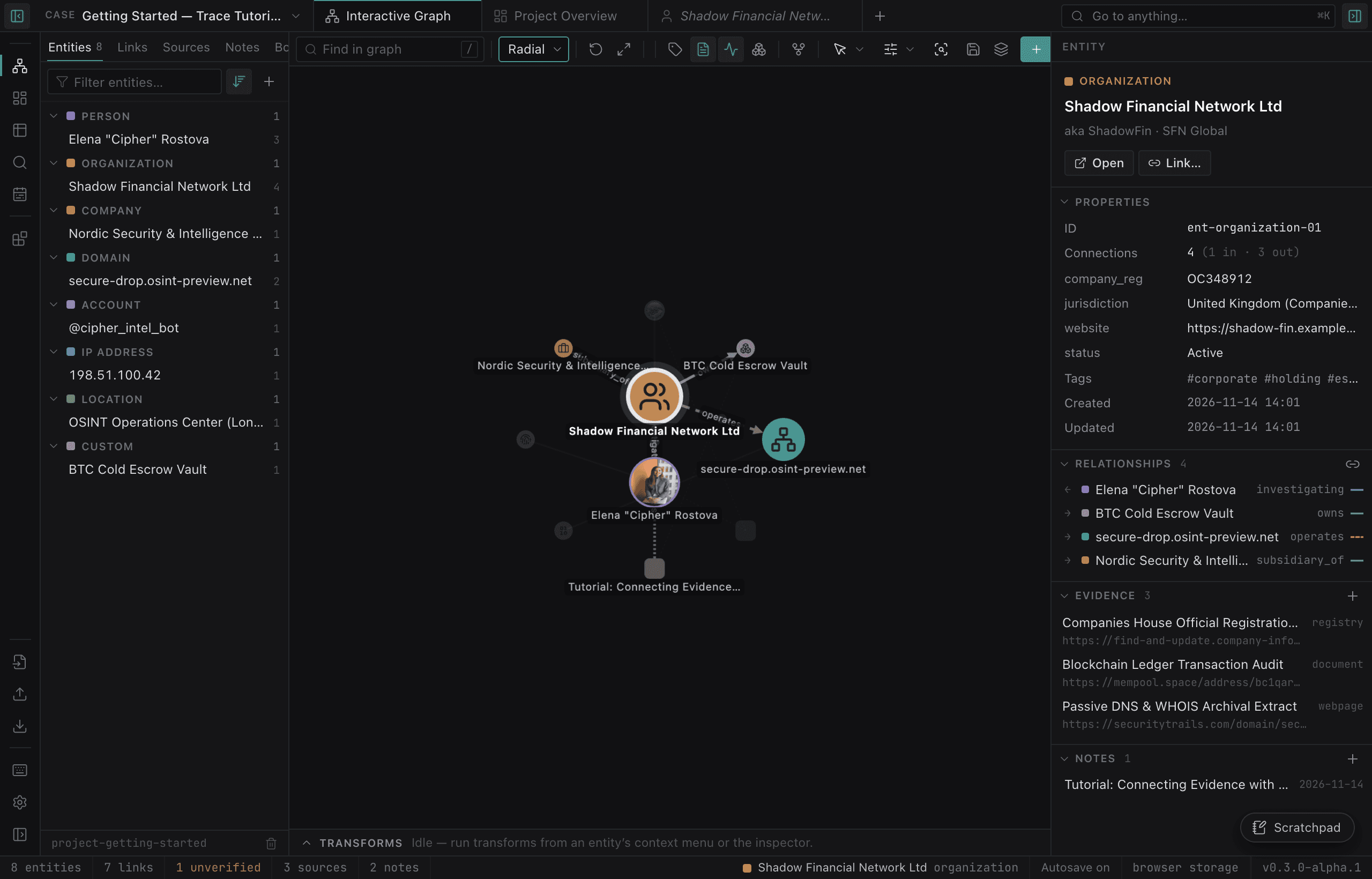
A graph that shows what is verified
Force-directed layout for thousands of nodes. Solid links are confirmed, dashed are not. Dots show which links cite a source.
- Shortest path
- “As of date” filter
- Connect mode
EVIDENCE_CAPTURE02
Evidence you can prove
Capture a page as screenshot, PDF and MHTML with a SHA-256, then verify it later.
- Admiralty ratings
- Wayback lookup
TOOLS_MARKETPLACE03
Tools marketplace
Install Sherlock, Maigret, Holehe, Ignorant, DNSRecon and dnstwist in isolated Python environments.
MERGE_TIMELINE04
Merge and timeline
Merge duplicates with a preview of every change. See relationship periods on a timeline.
HISTORY_BACKUPS05
History and backups
Autosave, version history with diff and restore, and rotating backups.
- Desktop app
ENCRYPTION_TOR06
Encryption and Tor
Encrypt a case with a passphrase. Route tools and requests through Tor or your own proxy.
- scrypt + AES-256-GCM
- No recovery
MCP_READ_ONLY07
MCP for agents
A built-in, read-only MCP server lets agents explore a case but never change it. Off by default.
COMMAND_PALETTE08
Command palette
Press ⌘K to find every action in the app. Light and dark themes included.
From a lead to a report
- 01
Collect
Run tools, import SpiderFoot, CSV, lists or JSON, or paste text and let Trace find emails, domains, IPs, phones, @handles and crypto wallets.
- 02
Review
Nothing enters the case unreviewed. Likely duplicates are flagged and linked instead of overwritten.
- 03
Link & rate
Connect entities, set a verification status and cite sources with Admiralty ratings. Discover suggests unverified candidates.
- 04
Report
Export Markdown, HTML or PDF with numbered sources and evidence hashes. Export the graph as GraphML or STIX 2.1.
Your data is a folder
Every entity, relationship, source and note is a Markdown file with YAML frontmatter. Open them in any editor, search them with grep, track them with git.
- format
- Markdown + YAML frontmatter
- location
- ~/Documents/trace
- sync
- none
- vcs
- git-friendly
~/Documents/trace/projects/<project-id>/├── project.md # scope, status, briefing├── entities/*.md # one file per entity├── relationships/*.md # direction, status, confidence, dates, evidence├── sources/*.md # provenance, rating, archive link, capture hashes├── evidence/<source>/<capture>/│ ├── screenshot.png│ ├── page.pdf│ ├── page.mhtml│ └── capture.json # URL, time (UTC), SHA-256 of each file├── notes/*.md # analyst notes└── graph-layout.json # saved node positions---id: northgate-freighttype: companyname: Northgate Freight Ltdaliases: [Northgate]tags: [lead, logistics]attributes: domain: northgate-freight.example country: GBcreated_at: '2026-11-02T09:14:00.000Z'updated_at: '2026-11-05T16:40:00.000Z'---Registered at the address below. See [[Harbour Point Office]] for theshared premises and the linked source for the registry extract.Illustrative example with fictional data.
Private by default. Honest about the limits.
What Trace does
PROTECTED- 01No accounts, no cloud sync, no telemetry.
- 02Per-case encryption with scrypt and AES-256-GCM.
- 03Tor or proxy routing for tools, page capture and API requests. Nothing falls back to a direct connection.
- 04API keys are stored in the system keychain and never written into a case.
- 05Version history and rotating backups of the whole case.
Limits you should know
LIMITS- 01Trace is alpha software.
- 02Builds are unsigned (macOS ad-hoc). Your OS will warn on first launch.
- 03History, backups, encryption, page capture, proxy and keys need the desktop app.
- 04There is no recovery for a lost encryption passphrase.
- 05An unlocked case is an ordinary folder, readable by anything on your computer.
- 06There is no auto-update yet.
Let agents read your case. Never write to it.
Trace ships a local Model Context Protocol server. It has no tool that creates, edits or deletes anything, and it is off by default. Turn it on under Tools → MCP server, which shows the exact configuration for your install.
{ "mcpServers": { "trace": { "command": "/Applications/Trace.app/Contents/MacOS/Trace", "args": ["/Applications/Trace.app/Contents/Resources/mcp/trace-mcp.mjs"], "env": { "ELECTRON_RUN_AS_NODE": "1" } } }}Read-only tools
8 tools- list_projects
- Investigations with entity, relationship, source and note counts
- get_project_summary
- Counts, statuses, unsourced links and most connected entities
- search_entities
- Ranked search over names, aliases, tags, attributes and notes
- get_entity
- Attributes, aliases, tags, notes and provenance
- get_entity_neighbors
- Subgraph around an entity, up to depth 3
- get_relationship
- Endpoints, status, evidence class and sources
- get_evidence
- Sources behind a link or an entity
- find_paths
- All shortest paths between two entities
Questions, answered plainly
Start your first case
Download Trace, open the Getting Started case that ships with the app, and press ⌘K.
Other downloads- Platforms
- macOS
- Apple Silicon · Intel
- Windows
- x64
- Linux
- x64 · AppImage · tar.gz
- License
- MIT